LightX2V Multi-Platform Deployment Solutions
Video generation inference has long been tightly coupled to the NVIDIA CUDA ecosystem. FlashAttention, cuBLAS, and NCCL are deeply embedded in the hot path of DiT inference. When deploying LightX2V on domestic or alternative AI accelerators—Cambricon MLU, Ascend NPU, Hygon DCU, MetaX, AMD ROCm, and others—the challenge is not just “make PyTorch run,” but aligning every performance-critical operator (Attention, quantized MatMul, RMSNorm, RoPE, etc.) with the chip vendor’s native kernel APIs.
lightx2v_platform is a standalone functional layer decoupled from the core lightx2v inference engine. Its job is to unify inference interfaces across non-NVIDIA chip backends. To support a new accelerator, you only need to implement the corresponding device abstraction and operator kernels inside lightx2v_platform—the upper-level model runners, schedulers, and pipeline logic remain unchanged.
Table of contents:
- Why a Separate Platform Layer?
- Architecture Overview
- Core Design: Registry + Template + Environment Variable
- Supported Backends and Operator Coverage
- How It Integrates with LightX2V
- Quick Start: Running on a Non-NVIDIA Platform
- Porting a New Chip Backend
- Resources
Why a Separate Platform Layer?
LightX2V’s core codebase is organized around model structure, scheduling, parallelism, and offload—these concerns are hardware-agnostic in principle. What is hardware-specific are the low-level compute kernels:
| Operator Category | Typical NVIDIA Implementation | What Changes on Other Chips |
|---|---|---|
| Attention | FlashAttention / SageAttention | Vendor fusion ops (e.g. npu_fusion_attention, tmo.flash_attention) |
| Quantized MatMul | CUTLASS / sgl_kernel / vLLM quant | Vendor quant APIs (e.g. npu_quant_matmul, tmo.scaled_matmul) |
| Normalization | Triton / CUDA kernels | Vendor RMSNorm / LayerNorm |
| RoPE | Custom CUDA | Vendor-specific or fallback to PyTorch |
| Distributed | NCCL | CNCL (MLU), HCCL (NPU), RCCL (ROCm), etc. |
Without a dedicated abstraction layer, every new chip would require scattered if platform == ... branches throughout the model code. lightx2v_platform solves this by:
- Isolating all chip-specific logic into a single module.
- Registering platform kernels through a unified registry mechanism.
- Selecting the correct implementation at runtime via the
PLATFORMenvironment variable and JSON config fields likeself_attn_1_type.
The result: LightX2V’s upper layers always call the same interface (AttnWeightTemplate.apply, MMWeightTemplate.apply, etc.), regardless of which chip is underneath.
lightx2v_platform Architecture Overview
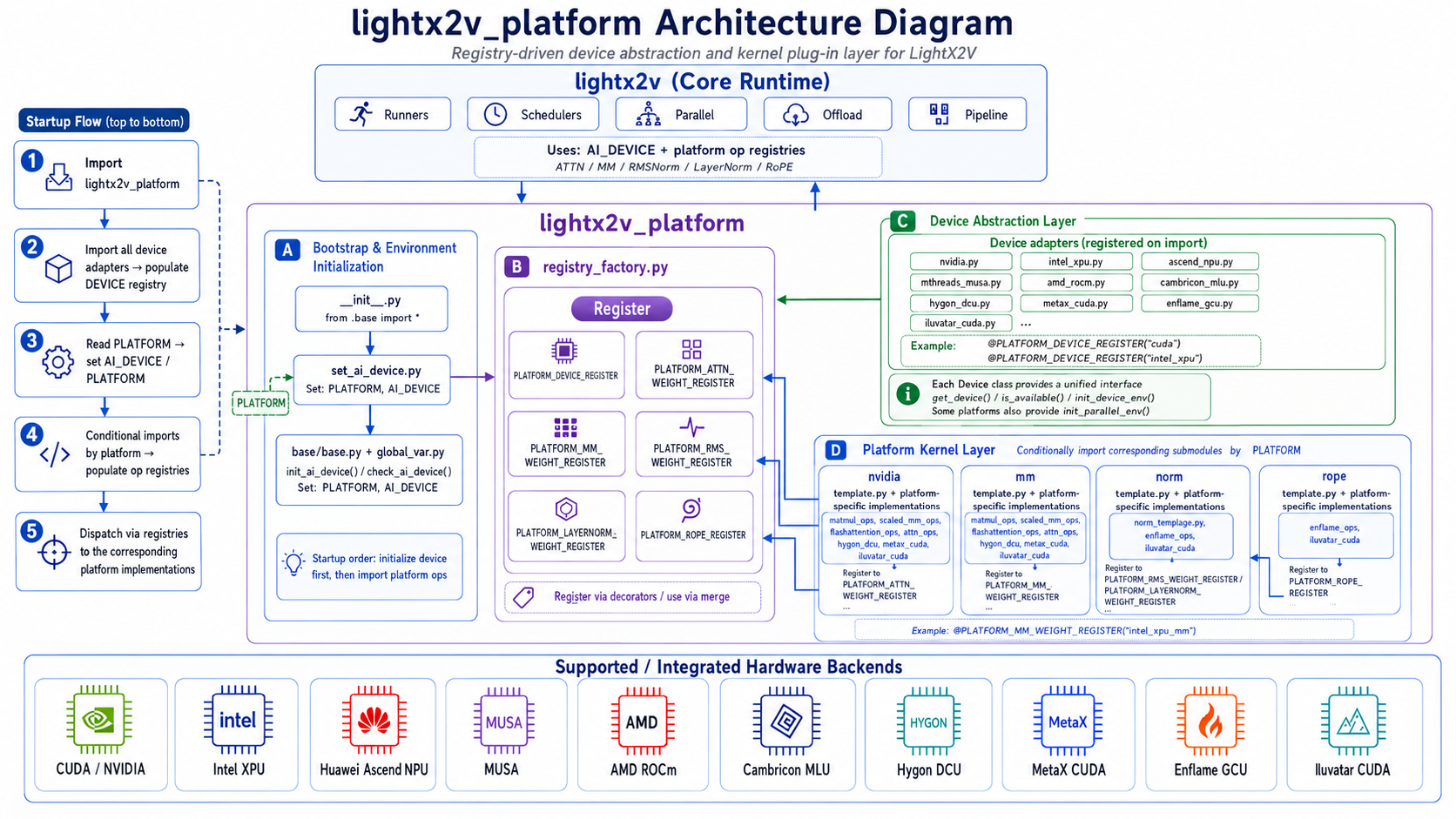
Source code: https://github.com/ModelTC/LightX2V/tree/main/lightx2v_platform
The module has two main parts:
base/— Device abstraction. Each chip backend registers a*Deviceclass that handles device initialization, availability checks, device name resolution, and distributed backend setup (e.g. NCCL for CUDA, CNCL for MLU, HCCL for NPU).ops/— Operator kernels organized by category (attn,mm,norm,rope), with per-platform subdirectories containing chip-specific implementations.
At import time, set_ai_device.py reads the PLATFORM environment variable, initializes the device, and conditionally loads the corresponding operator modules.
Core Design: Registry + Template + Environment Variable
1. Registry Pattern
registry_factory.py defines a lightweight Register class and six platform-level registries:
PLATFORM_DEVICE_REGISTER = Register()
PLATFORM_ATTN_WEIGHT_REGISTER = Register()
PLATFORM_MM_WEIGHT_REGISTER = Register()
PLATFORM_RMS_WEIGHT_REGISTER = Register()
PLATFORM_LAYERNORM_WEIGHT_REGISTER = Register()
PLATFORM_ROPE_REGISTER = Register()
Each chip backend registers its implementations via decorators. For example, Ascend NPU registers its Flash Attention kernel as "npu_flash_attn":
@PLATFORM_ATTN_WEIGHT_REGISTER("npu_flash_attn")
class NpuFlashAttnWeight(AttnWeightTemplate):
    def apply(self, q, k, v, ...):
        x = torch_npu.npu_fusion_attention(q, k, v, ...)
        return x
On the LightX2V side, lightx2v/utils/registry_factory.py merges the platform registries into the main registries at startup:
ATTN_WEIGHT_REGISTER.merge(PLATFORM_ATTN_WEIGHT_REGISTER)
MM_WEIGHT_REGISTER.merge(PLATFORM_MM_WEIGHT_REGISTER)
RMS_WEIGHT_REGISTER.merge(PLATFORM_RMS_WEIGHT_REGISTER)
LN_WEIGHT_REGISTER.merge(PLATFORM_LAYERNORM_WEIGHT_REGISTER)
ROPE_REGISTER.merge(PLATFORM_ROPE_REGISTER)
This means platform kernels appear alongside NVIDIA-native kernels in the same lookup table. The JSON config simply specifies which kernel name to use—no platform-specific branching in model code.
2. Template Classes
Each operator category defines an abstract template in ops/:
| Template | Location | Key Method |
|---|---|---|
AttnWeightTemplate |
ops/attn/template.py |
apply(q, k, v, ...) |
MMWeightTemplate / MMWeightQuantTemplate |
ops/mm/template.py |
load(), apply() |
RMSWeightTemplate |
ops/norm/norm_template.py |
apply(input_tensor) |
LayerNormWeightTemplate |
ops/norm/norm_template.py |
apply(input_tensor) |
RopeTemplate |
ops/rope/rope_template.py |
apply(xq, xk, cos_sin_cache) |
Templates handle the common logic—weight loading, CPU/GPU buffer management, lazy load, state dict serialization—while subclasses only implement the chip-specific apply() (and optionally custom load() / quantization paths).
For quantized MatMul, MMWeightQuantTemplate provides a rich set of built-in weight/act quantization helpers (load_int8_perchannel_sym, load_fp8_perchannel_sym, etc.), so platform implementations often only need to plug in the vendor’s act_quant_func and kernel call.
3. Environment Variable PLATFORM
The PLATFORM environment variable is the single switch that selects the chip backend:
export PLATFORM=ascend_npu    # Huawei Ascend 910B
export PLATFORM=cambricon_mlu # Cambricon MLU590
export PLATFORM=amd_rocm      # AMD MI350
export PLATFORM=hygon_dcu     # Hygon DCU
export PLATFORM=metax_cuda    # MetaX C500
export PLATFORM=musa          # MThreads MUSA
export PLATFORM=enflame_gcu   # Enflame S60 (GCU)
export PLATFORM=intel_xpu     # Intel AIPC PTL
export PLATFORM=iluvatar_cuda # Iluvatar
# Default (unset): cuda (NVIDIA)
The initialization flow in set_ai_device.py:
- Read
PLATFORMfrom environment (default:"cuda"). - Call
init_ai_device(platform)→ look up the device class inPLATFORM_DEVICE_REGISTER, set globalAI_DEVICEandPLATFORM. - Call
check_ai_device(platform)→ verify the chip runtime is available. - Conditionally import platform-specific ops modules (e.g. only load
ops/attn/ascend_npu/whenPLATFORM=ascend_npu).
Since lightx2v/__init__.py imports lightx2v_platform.set_ai_device at package load time, the platform is initialized automatically whenever LightX2V is imported.
4. Global Variables
base/global_var.py exposes two module-level globals used throughout LightX2V:
AI_DEVICE— the PyTorch device string (e.g."cuda","npu","mlu","xpu").PLATFORM— the platform identifier string (e.g."ascend_npu","cambricon_mlu").
All tensor placement in LightX2V references AI_DEVICE instead of hardcoded "cuda", enabling transparent multi-platform execution.
Supported Backends and Operator Coverage
Currently supported backends:
| Chip | PLATFORM Value |
Device String | Distributed Backend |
|---|---|---|---|
| NVIDIA GPU | cuda (default) |
cuda |
NCCL |
| Cambricon MLU590 | cambricon_mlu |
mlu |
CNCL |
| MetaX C500 | metax_cuda |
cuda |
NCCL |
| Hygon DCU | hygon_dcu |
cuda |
NCCL |
| Huawei Ascend 910B | ascend_npu |
npu |
HCCL |
| AMD ROCm (MI350) | amd_rocm |
cuda |
NCCL (RCCL) |
| MThreads MUSA | musa |
musa |
MCCL |
| Enflame S60 (GCU) | enflame_gcu |
gcu |
ECCL |
| Intel AIPC PTL | intel_xpu |
xpu |
CCL |
| Iluvatar | iluvatar_cuda |
cuda |
NCCL |
Operator kernel coverage per platform (registered names that can be referenced in JSON configs):
| Platform | Attention | Quantized MatMul | Normalization | RoPE |
|---|---|---|---|---|
| cambricon_mlu | mlu_flash_attn, mlu_sage_attn |
int8-tmo |
mlu_rms_norm |
— |
| ascend_npu | npu_flash_attn |
int8-npu |
— (use torch) |
— |
| hygon_dcu | flash_attn_hygon_dcu |
int8-vllm-hygon-dcu |
— | — |
| amd_rocm | aiter_attn |
via aiter compat layer | — | — |
| enflame_gcu | flash_attn_enflame_gcu |
— | gcu_layer_norm |
enflame_wan_rope |
| intel_xpu | intel_xpu_flash_attn |
intel_xpu_mm, intel_xpu_fp8 |
— | — |
| iluvatar_cuda | iluvatar_flash_attn |
int8-iluvatar |
iluvatar_rms_norm |
iluvatar_wan_rope |
| metax_cuda | metax_sage_attn2 |
— (default CUDA kernels) | — | — |
| musa | — (fallback torch_sdpa) |
— | — | — |
Platforms without a custom kernel for a given operator category can fall back to PyTorch native implementations by setting the corresponding *_type field to "torch" in the JSON config.
How It Integrates with LightX2V
The integration follows a clean three-step pattern:
Step 1 — Platform init at import time
# lightx2v/__init__.py
import lightx2v_platform.set_ai_device  # triggers device init + ops loading
Step 2 — Registry merge
Platform kernels are merged into LightX2V’s main registries, so model code uses a single lookup path:
# In model weight initialization (simplified)
attn_cls = ATTN_WEIGHT_REGISTER[config["self_attn_1_type"]]
self.self_attn = attn_cls()
Step 3 — Config-driven kernel selection
Each platform has dedicated JSON configs under configs/platforms/ that specify which registered kernel to use. For example, Ascend NPU Wan2.1 T2V:
{
    "self_attn_1_type": "npu_flash_attn",
    "cross_attn_1_type": "npu_flash_attn",
    "cross_attn_2_type": "npu_flash_attn",
    "rms_norm_type": "torch",
    "cpu_offload": true,
    "offload_granularity": "model"
}
Cambricon MLU uses its own optimized kernels:
{
    "self_attn_1_type": "mlu_sage_attn",
    "cross_attn_1_type": "mlu_sage_attn",
    "cross_attn_2_type": "mlu_sage_attn",
    "rms_norm_type": "mlu_rms_norm"
}
This design means LightX2V features like parallelism, offload, and disaggregated deployment work on non-NVIDIA platforms without modification—the platform layer only replaces the compute kernels and device management underneath.
Quick Start: Running on a Non-NVIDIA Platform
Here is a minimal example for running Wan2.1 T2V on Ascend 910B:
# 1. Set platform and visible devices
export PLATFORM=ascend_npu
export ASCEND_RT_VISIBLE_DEVICES=0

# 2. Run inference with platform-specific config
python -m lightx2v.infer \
  --model_cls wan2.1 \
  --task t2v \
  --model_path $model_path \
  --config_json configs/platforms/ascend_npu/wan_t2v.json \
  --prompt "Two anthropomorphic cats in comfy boxing gear..." \
  --save_result_path output.mp4
Key points:
- Always set
PLATFORMbefore importing LightX2V (or use the provided shell scripts that export it). - Use the matching config from
configs/platforms/<platform>/. - Refer to
scripts/platforms/<platform>/for complete, tested launch scripts covering Wan, Qwen-Image, Z-Image, and other models.
Porting a New Chip Backend
Adding support for a new accelerator requires changes only inside lightx2v_platform. Here is the step-by-step workflow:
Step 1: Implement Device Abstraction
Create base/my_chip.py:
from lightx2v_platform.registry_factory import PLATFORM_DEVICE_REGISTER

@PLATFORM_DEVICE_REGISTER("my_chip")
class MyChipDevice:
    name = "my_chip"

    @staticmethod
    def init_device_env():
        pass  # any chip-specific env setup

    @staticmethod
    def is_available() -> bool:
        # check chip runtime is installed and hardware is present
        ...

    @staticmethod
    def get_device() -> str:
        return "my_device"  # PyTorch device string

    @staticmethod
    def init_parallel_env():
        dist.init_process_group(backend="my_backend")
        ...
Register it in base/__init__.py.
Step 2: Implement Operator Kernels
For each operator category the chip supports, create implementations under ops/<category>/my_chip/:
ops/
├── attn/my_chip/flash_attn.py      → @PLATFORM_ATTN_WEIGHT_REGISTER("my_chip_flash_attn")
├── mm/my_chip/mm_weight.py         → @PLATFORM_MM_WEIGHT_REGISTER("int8-my_chip")
├── norm/my_chip/rms_norm.py        → @PLATFORM_RMS_WEIGHT_REGISTER("my_chip_rms_norm")
└── rope/my_chip/wan_rope.py        → @PLATFORM_ROPE_REGISTER("my_chip_wan_rope")
Each class inherits from the corresponding template and implements the apply() method using the vendor’s kernel API.
Step 3: Register Ops Loading
Add a branch in ops/__init__.py:
elif PLATFORM == "my_chip":
    from .attn.my_chip import *
    from .mm.my_chip import *
Step 4: Provide Config and Scripts
- Add JSON configs under
configs/platforms/my_chip/. - Add launch scripts under
scripts/platforms/my_chip/. - Optionally add a Dockerfile under
dockerfiles/platforms/.
Step 5: Test
PLATFORM=my_chip python lightx2v_platform/test/test_device.py
# Then run a full inference with the platform config
No changes to lightx2v/ model code, runners, or schedulers are needed.
Resources
- Platform module:
LightX2V/lightx2v_platform - Docker environments:
dockerfiles/platforms - Launch scripts:
scripts/platforms - Platform configs:
configs/platforms
lightx2v_platform turns multi-chip deployment from a cross-cutting refactor into a localized, registry-driven extension problem. Whether you are running on Cambricon MLU in a data center, Ascend NPU in a cloud cluster, or Intel XPU on a laptop, the same LightX2V pipeline code path applies—you just point PLATFORM at the right backend and select the matching config.