LightX2V ROS: Closing the Loop for Action-Generating World Models
A world model that can output actions does not automatically become a system capable of controlling a robot after a single inference pass.
Real robotic control is a continuous loop: the model reads images and robot states from the current environment and predicts an action; the environment executes the action and changes; the model then reads the new observation and predicts the next action. If this loop is broken, the model produces only an offline trajectory rather than a policy that can interact with the environment.
This is exactly the problem that LightX2V ROS solves. It packages the vision-action models in LightX2V, the LIBERO/RoboTwin/RoboLab simulation environments, and the visualization and control interface as independent ROS 2 nodes. Unified topics connect these nodes into a closed-loop system that can run continuously, switch tasks, and track evaluation results.
Why Action-Generating World Models Must Operate in a Closed Loop
The inputs and outputs of conventional video generation models are usually one-shot. Given an image or a text prompt, the model generates a complete video, and the task ends there.
Robot policies work differently. Suppose the environment observation at time t is o_t. The policy predicts an action from that observation:
a_t = Policy(o_t, state_t, instruction)
After the robot or simulation environment executes the action, the environment transitions to a new state and produces the next observation:
(o_{t+1}, state_{t+1}) = Environment.step(a_t)
The model must continue inference from o_{t+1}. This process repeats until the task succeeds or the maximum number of execution steps is reached:
Observe -> Infer -> Act -> Observe -> Infer -> Act -> ...
Even when the model generates an Action Chunk at a time, it cannot execute that chunk blindly and indefinitely. After executing several actions, observing the environment again and planning a new Action Chunk from real feedback is generally more reliable than fully open-loop execution. Objects may slip, the robot arm may incur execution errors, and contact states in the simulator may differ from those in the predicted video. Fresh observations from the real environment are the only way to correct these errors.
Here, the Environment can be a physical robot or robot arm, or a simulated robot in LIBERO, RoboTwin, or RoboLab. Regardless of the platform, the model needs the same kind of closed loop: consume an observation, output an action, wait for the environment to execute it, and then consume the next observation.
The Core Principle of LightX2V ROS: Isolating Models from Environments
The most straightforward implementation is to create the simulation environment directly inside a model’s Python script and call both the model and the environment from one large loop. This approach quickly causes problems: the model code depends on PyTorch, CUDA, and weight loading, while the simulation environments depend on MuJoCo, SAPIEN, or IsaacSim/IsaacLab. A change on either side can force changes on the other.
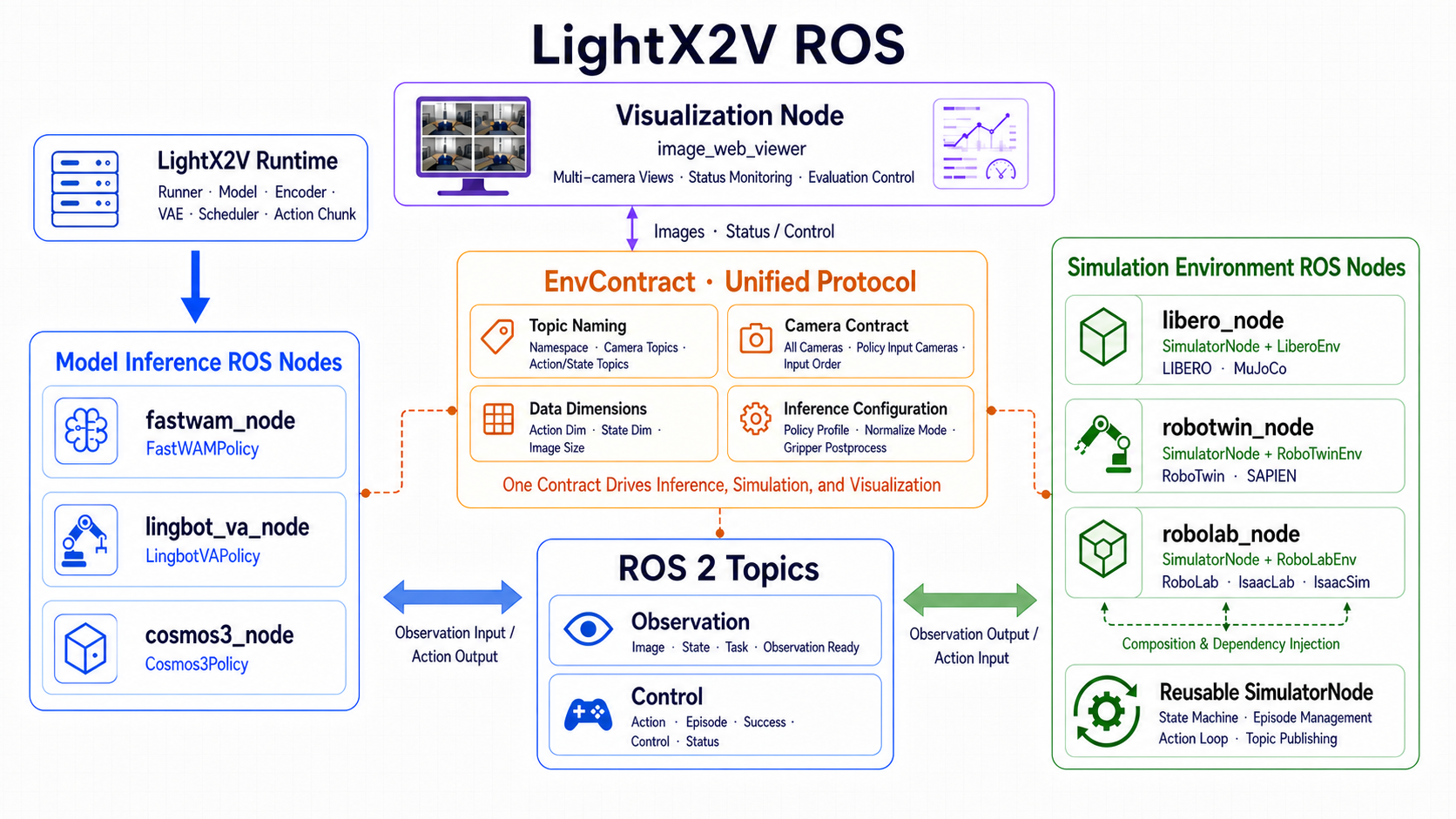
Instead of placing every component in a single process, LightX2V ROS separates them into independent ROS 2 nodes:
fastwam_node,lingbot_va_node, andcosmos3_nodehandle model inference.libero_node,robotwin_node, androbolab_noderun the simulation environments.image_web_viewerprovides live views, task status, and evaluation controls.common.EnvContractdefines the interface shared by both sides.
Inference nodes do not need to import a simulator, and simulation nodes do not need to load model weights. They exchange standard messages exclusively through ROS topics. This allows the models and environments to use different Python environments and GPUs, or even run on different machines, as long as they belong to the same reachable ROS domain.
Data Plane and Control Plane
Each environment has its own namespace, such as /libero, /robotwin, or /robolab. The core topics are:
| Topic | Message Type | Purpose |
|---|---|---|
/<env>/<camera>/image_raw |
sensor_msgs/Image |
RGB camera image |
/<env>/state |
Float32MultiArray |
Robot proprioceptive state |
/<env>/task_description |
String |
Natural-language task instruction |
/<env>/observation_ready |
Int32 |
Sequence number of a newly submitted observation |
/<env>/action |
Float32MultiArray |
Action produced by the model |
/<env>/episode |
Int32 |
Episode sequence number used to reset policy state |
/<env>/success |
Bool |
Whether the current task has succeeded |
/<env>/control |
JSON String |
start/pause/resume/restart/set_task |
/<env>/status |
JSON String |
State machine, task configuration, history, and success rate |
The observation_ready topic is the key to closed-loop synchronization. The simulation node first publishes images, robot state, and task text, and then publishes a monotonically increasing observation index. Only when the inference node sees a new, unprocessed index does it read the latest cached observation and produce an action.
When the action reaches the simulation node, the node executes env.step(action), obtains a new observation, and publishes it again. This creates a strict observation-action loop. A periodic republishing mechanism also lets inference and visualization nodes that start late obtain the current state instead of waiting indefinitely because they missed the first frame.
A Unified Interface for Simulation Environments
Running the model and environment in separate processes is only the first step. The more important challenge is that the native APIs, camera names, robot states, and action semantics of the three simulation environments are entirely different. If inference nodes had to understand these differences directly, every new model would require separate environment-specific code for LIBERO, RoboTwin, and RoboLab.
LightX2V ROS avoids this duplication with a three-layer design.
EnvContract: A Single Source of Truth for the Protocol
EnvContract in common/contract.py defines the following for each environment:
- The namespace and all derived topic names
- Every camera that the environment can publish
- The subset of cameras actually used by the policy, in a fixed order
- Action and state dimensions
- Recommended image dimensions
- The policy profile, normalization mode, and gripper post-processing method
The inference, simulation, and visualization nodes all read the same contract, so they do not separately hard-code values such as /libero/action or the camera list. For example, the viewer displays all cameras in contract.cameras by default, while the inference node subscribes only to contract.policy_input_cameras.
The current contracts are:
| Environment | Policy Input Cameras | State | Action |
|---|---|---|---|
| LIBERO | agentview, wrist |
8 | 7 |
| RoboTwin | head_camera, left_camera, right_camera |
14 | 14; also supports LingBot-VA’s 16-dimensional end-effector action |
| RoboLab | wrist_cam, over_shoulder_left_camera, over_shoulder_right_camera |
8 | 8 |
BaseSimEnv: Abstracting Away Native Simulator APIs
sim/base_env.py defines an environment-agnostic interface:
reset() -> Observation
step(action) -> tuple[Observation, bool]
new_episode() -> Observation
The unified Observation contains only two fields:
images: dict[str, np.ndarray]  # H x W x 3 RGB uint8
state: np.ndarray              # One-dimensional float32 vector
Each concrete environment only needs to convert its native output into this structure and map unified actions back to its native control interface.
The LIBERO adapter combines the end-effector position, quaternion converted to axis-angle, and gripper qpos into an 8-dimensional state while also correcting camera image orientation. Its 7-dimensional actions are passed directly to the MuJoCo environment.
The RoboTwin adapter outputs a 14-dimensional joint state and supports two kinds of actions: FastWAM’s 14-dimensional absolute qpos and LingBot-VA’s 16-dimensional bimanual relative end-effector pose. The latter is converted into absolute end-effector targets at the environment boundary before being passed to SAPIEN. The model node does not need to contain any SAPIEN control code.
The RoboLab adapter handles the IsaacSim/IsaacLab startup sequence, Tensor-to-NumPy conversion, and camera batch dimensions. It also combines arm_joint_pos + gripper_pos into a unified 8-dimensional state. The 8-dimensional action produced by Cosmos3 is converted into a batched Tensor on the target device before execution.
SimulatorNode: One ROS Loop, Three Runtime Instances
SimulatorNode in sim/node.py implements the shared ROS publishers and subscribers, episode management, and evaluation state machine. It receives contract and env_factory as constructor arguments:
SimulatorNode(contract, env_factory, node_name=...)
This design uses composition and dependency injection. SimulatorNode holds self.env internally but does not know whether it is a LiberoEnv, RoboTwinEnv, or RoboLabEnv. The three launch entry points create three differently configured SimulatorNode instances rather than running an additional generic simulator node.
The state machine supports ready, running, paused, success, failure, and switching. It also handles maximum step limits, continuous evaluation, task switching, episode history, and publishing intermediate frames to the viewer.
The immediate benefit of this design is that a new model only needs to adapt to the ROS inputs and outputs defined by the contract; it does not need a separate execution loop for every simulation environment. Likewise, adding a simulation environment requires only a new BaseSimEnv implementation and contract, with no changes to the shared SimulatorNode.
How ROS Nodes Invoke the Actual LightX2V Runtime
The three inference nodes serve as the external ROS interfaces, while the actual model loading, encoders, VAE, scheduler, and Action Chunk generation remain within the LightX2V Runtime.
Rather than repeatedly launching python -m lightx2v.infer from a shell, the ROS nodes directly import the long-lived policy wrappers from the LightX2V runner modules. Model weights are loaded only once, and next_action() is called for each subsequent observation index.
FastWAM
fastwam_node uses FastWAMPolicy. The policy selects cameras according to the contract: LIBERO concatenates agentview | wrist, while RoboTwin uses a T-shaped layout comprising the head camera and both wrist cameras. Images are encoded by the Wan VAE, task text by T5, and robot states are normalized with dataset statistics before FastWAMNativeModel generates an Action Chunk.
The policy enqueues only the first actions_per_plan actions specified in the configuration. ROS pops one action each time a new observation arrives. When the queue is exhausted, the policy replans from the latest real observation.
LingBot-VA
lingbot_va_node creates an actual LingbotVARunner but switches it to online closed-loop mode. The first observation initializes text encoding, the Streaming VAE, and the KV Cache; the model then jointly generates video and an Action Chunk.
While executing an Action Chunk, the node collects real camera frames at the VAE time-step interval. After the chunk has been executed, update_online_cache() replaces the predicted history with real observations and the actions that were actually executed, then generates the next chunk. This is the key mechanism that turns LingBot-VA from offline video-action generation into a closed-loop policy.
Cosmos3
cosmos3_node uses Cosmos3Policy and the actual Cosmos3Runner. RoboLab’s wrist view and two shoulder views are composed into the layout required by Policy-DROID, while the 8-dimensional robot state is fed into the model as an action-history condition.
In a multi-GPU configuration, only rank 0 participates in ROS DDS communication. Rank 0 broadcasts the complete observation and step/reset/stop commands to the other torchrun ranks. All ranks enter model collectives in sync, and only rank 0 publishes the final action to RoboLab. This preserves LightX2V’s parallel inference capabilities without creating duplicate nodes or actions in the ROS graph.
Visualization Node
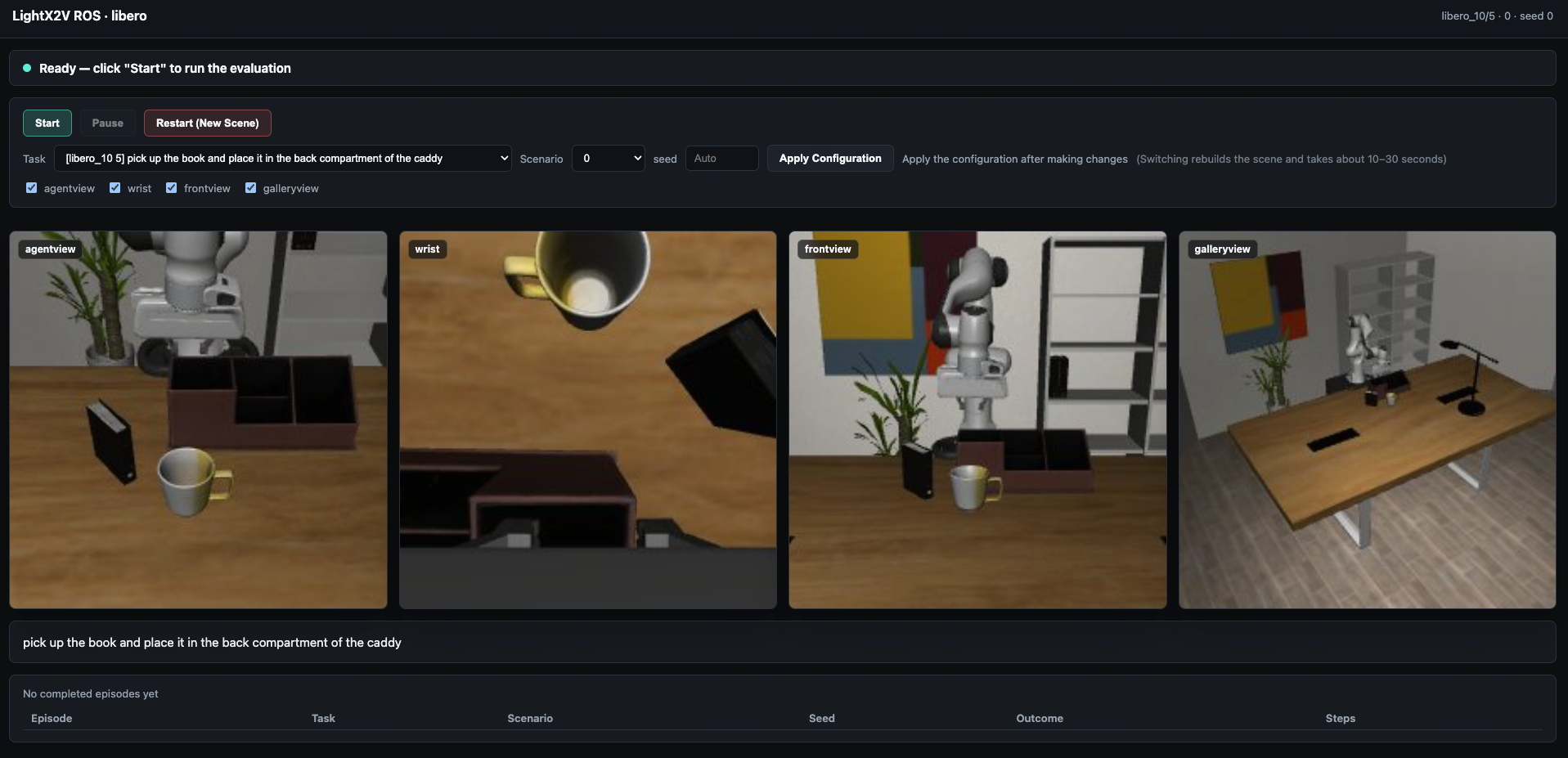
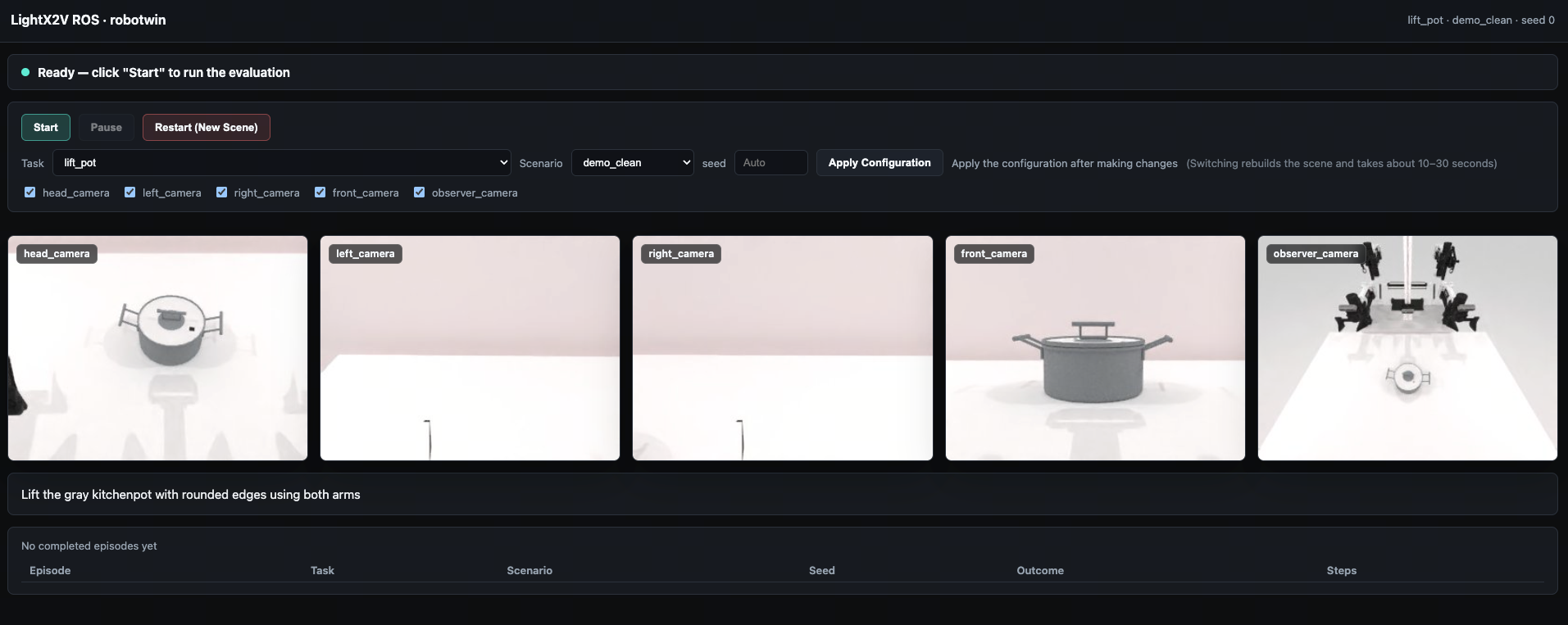
The image_web_viewer_node automatically subscribes to every camera in the current environment based on the EnvContract. It encodes ROS images as JPEG and serves MJPEG streams through a multithreaded HTTP server.
The following screenshot shows the visualization interface for the LIBERO environment:
The following screenshot shows the visualization interface for the RoboTwin environment:
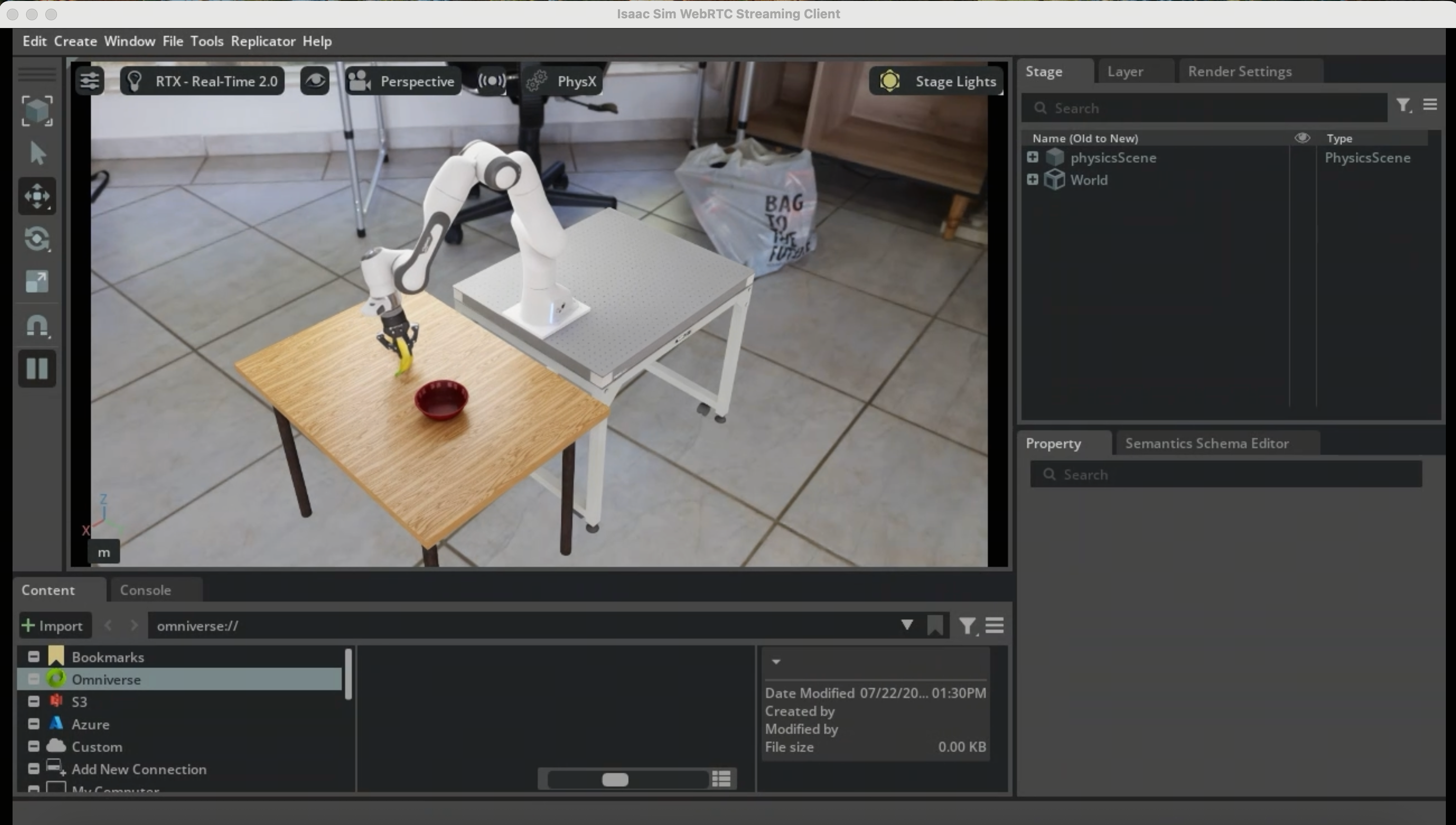
The Isaac client provides a WebRTC-based interface for visualizing the simulation: