Running Autoregressive Video Models with Less VRAM: KV Cache Management in LightX2V
In video generation, VRAM pressure does not only come from model weights. For autoregressive video generation, real-time world models, and long-sequence video generation, KV Cache grows with generation length, frame count, resolution, and the number of Transformer layers. Weights can be temporarily moved to CPU or disk through offload, but KV Cache is a dynamic state created during inference, repeatedly read by attention, and continuously updated. It therefore needs its own management strategy.
LightX2V unifies multiple autoregressive video and world models under one KV Cache management path, and provides several strategies including rolling windows, KV quantization, and KV offload. These strategies can be used independently or combined with weight offload, making larger models practical on consumer GPUs such as RTX 3060, RTX 4090, and RTX 5090.
This article explains:
- why KV Cache becomes a major VRAM bottleneck in autoregressive video models;
- how KV Cache management differs from weight offload;
- how LightX2V organizes the KV Cache lifecycle;
- what rolling, quantization, and offload each solve;
- how to choose strategies for different GPU tiers.
Table of Contents:
- Why KV Cache Is a Core Bottleneck in Autoregressive Video Generation
- Design Goals of LightX2V KV Cache
- KV Cache vs. Weight Offload
- The Core KV Cache Path in LightX2V
- Three KV Cache Strategies
- KV Quantization Backends
- KV Offload Execution Timeline
- How to Enable KV Cache Strategies in Config
- Recommended Usage Strategies
- Conclusion
Why KV Cache Is a Core Bottleneck in Autoregressive Video Generation
In standard diffusion-based video generation, most VRAM pressure comes from weights, activations, and intermediate features. In autoregressive video generation or real-time world models, inference also introduces a continuously growing historical state: KV Cache.
Autoregressive video generation can be roughly understood as the following loop:
generated context  ->  current step / frame block  ->  generate new K/V  ->  write to KV Cache
                         ↑                                      ↓
                  attention reads historical KV  <---------------
The purpose of KV Cache is to avoid recomputing the Key and Value tensors for historical tokens or frames. It trades more cache storage for less repeated computation. The problem is that in video models this cache is not a small set of text tokens. It is a high-dimensional tensor related to frame count, spatial resolution, number of heads, head dimension, and number of layers.
KV Cache memory usage is usually related to:
num_layers × cache_length × num_heads × head_dim × 2(K/V) × dtype_size
For long videos or autoregressive world models, KV Cache can become a new VRAM wall even after weights have been reduced through offload. This is especially true for 14B-class models, higher resolutions, or longer contexts, where KV Cache size directly affects whether the model can run on a consumer GPU.
Design Goals of LightX2V KV Cache
LightX2V’s KV Cache management is not temporary logic for a single model. It is a unified resource management layer for multiple autoregressive models. It has three main goals.
First, a unified entry point.
Different autoregressive video models can create, initialize, and update KV Cache through the same KV Cache Manager. This reduces the complexity of maintaining separate cache logic for each model and makes it easier to add new autoregressive video or world models later.
Second, composable strategies.
KV Cache can use regular fp16 / bf16 storage, or it can enable quantization backends such as SageQuant, KIVI, and TurboQuant. It can also enable kv_offload. These strategies are not mutually exclusive: rolling windows control historical length, quantization reduces the storage cost of each cache entry, and offload moves part of the KV state to CPU memory.
Third, consumer GPU friendliness.
KV Cache quantization reduces the VRAM cost of each KV entry, while KV Cache offload moves part of the KV state from GPU to CPU. Both can also be combined with weight offload. The goal is to run larger autoregressive video models on GPUs such as RTX 4090, RTX 5090, and RTX 3060 while preserving generation quality as much as possible.
KV Cache vs. Weight Offload
Weight offload and KV Cache management are both VRAM optimization techniques, but they operate on very different data.
| Item | Weight Offload | KV Cache Management |
|---|---|---|
| Data source | Available when the model is loaded | Dynamically generated during inference |
| Lifecycle | Mostly fixed during inference | Grows or rolls forward with generation steps |
| Access pattern | Read when computing a block or phase | Repeatedly read by attention in every layer |
| Writes | Usually no writeback | New K/V is written at every step |
| Optimization focus | Where weights reside and when to load them | Capacity, compression, rolling windows, read/write, and offload |
| Main risk | Slow loading can reduce throughput | VRAM growth, read/write cost, dequantization cost, synchronization overhead |
In short: weight offload solves “the model is too large to fit”; KV Cache management solves “the historical state keeps growing during generation.”
This is why the two are often used together. For large models, weight offload reduces static weight pressure. For long autoregressive inference, KV quantization and KV offload control the dynamic historical state.
The Core KV Cache Path in LightX2V
The LightX2V KV Cache Manager computes cache size from the input latent shape, patch size, number of output frames, local attention settings, and related configuration. It then creates self-attention KV cache and cross-attention KV cache, and initializes the corresponding buffers.
The overall flow can be summarized as:
input latent shape
        ↓
compute frame_seq_length / output frames
        ↓
compute kv_size / max_attention_size / local_attn_size
        ↓
create self-attention KV cache
        ↓
create cross-attention KV cache
        ↓
initialize KV buffers
The self-attention KV cache is the main optimization target because it grows during autoregressive generation. The cross-attention KV cache is more static and is usually used for text or conditioning context.
In world-model scenarios, conditional inputs may also have their own KV caches. For example, keyboard actions and mouse actions can maintain separate caches. For conditions with spatial dimensions, such as mouse actions, a rolling cache with an additional spatial dimension can be used so that the same window management logic can support shapes like [S, N, H, D].
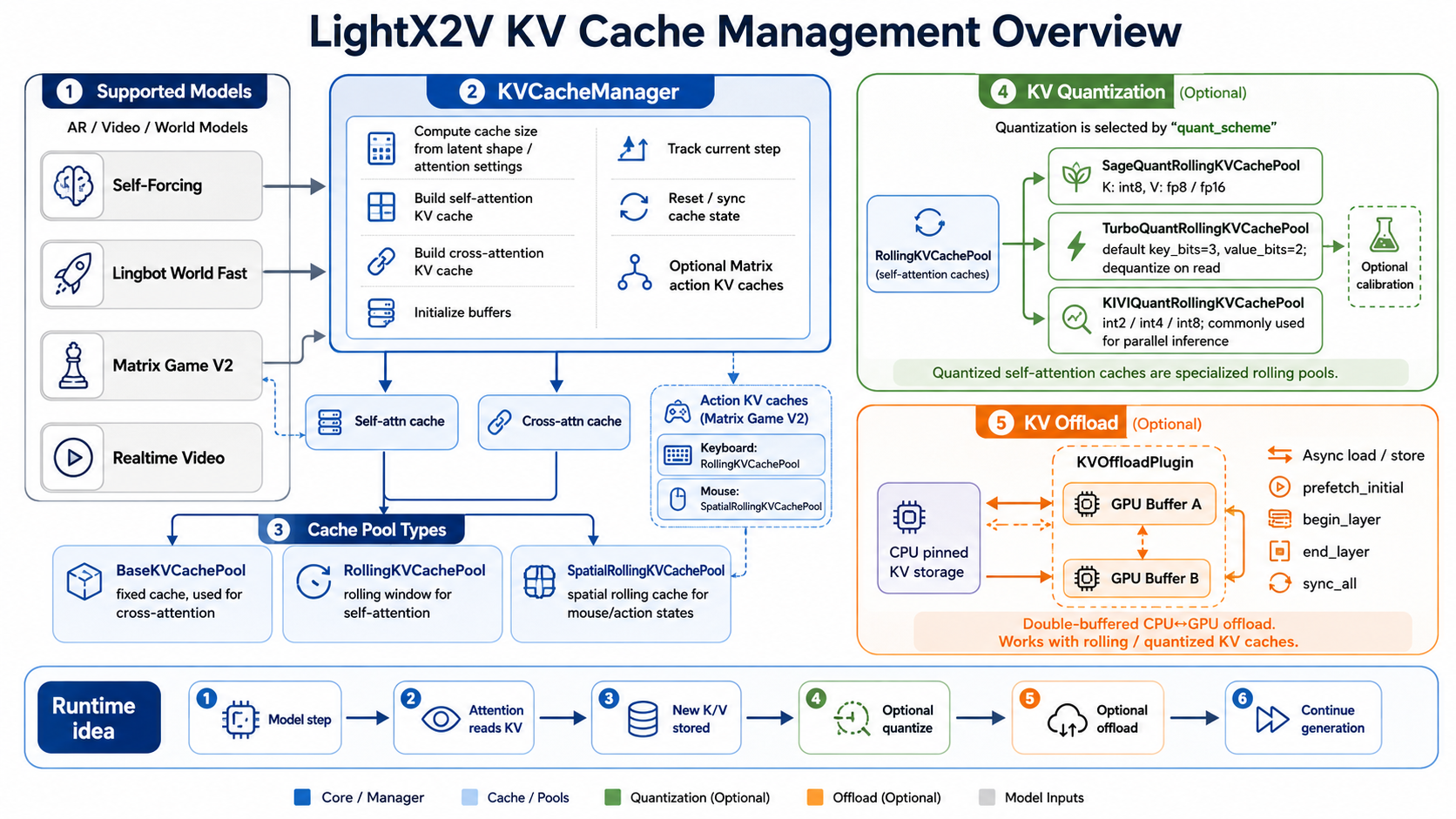 Figure 1: LightX2V KV Cache management overview. The KVCacheManager creates self-attention and cross-attention caches, and coordinates runtime paths across rolling, quantization, and offload strategies.
Three KV Cache Strategies
LightX2V KV Cache optimization can be understood through three strategies: rolling, quantization, and offload.
Rolling KV Cache: Controlling the History Window
The most basic strategy is rolling cache. The core idea is not to store all historical KV forever, but to maintain historical context within a fixed rolling window. For autoregressive video generation, this is often related to local attention, sink tokens / sink frames, and maximum attention size.
[ sink context ] [ rolling local window ]
       ↑                  ↑
  kept long-term      rolls forward during generation
This strategy controls the upper bound of KV Cache and prevents VRAM from growing without limit as generation becomes longer. Its key role is not to compress each KV entry, but to decide which historical context must be kept and which can be discarded as the window moves forward.
KV Quantization: Reducing the Storage Cost of Each KV Entry
The second strategy is quantization. KV quantization reduces the storage cost of each K/V element. For example, raw KV in fp16 usually takes 2 bytes per element; int8 or int4 can significantly reduce cache size.
LightX2V supports several KV quantization backends:
| Backend | Core idea | Best suited for |
|---|---|---|
| SageQuant | K int8, V fp8 / fp16, used together with SageAttention | Stable engineering path for general compression |
| KIVI | K/V int2, int4, int8 | More aggressive low-bit compression |
| TurboQuant | Key/value compression + codebook | More complex compression strategy for further reducing KV |
SageQuant deserves special attention. It is usually not just a standalone KV storage format. It is designed to work with the SageAttention backend: KV Cache is stored in a low-precision format that SageAttention can directly consume, and the attention kernel reads that format during computation. As a result, KV does not need to be explicitly dequantized back to fp16 / bf16 before attention. This is one reason why SageQuant is practical in engineering: it reduces VRAM usage while avoiding part of the extra dequantization overhead.
The benefit of quantization is straightforward: fewer bits usually mean lower VRAM usage. The cost depends on the backend. If the attention backend cannot directly consume the quantized format, KV may need to be dequantized on read. Writing KV also introduces quantization cost, and different bit widths can affect quality stability.
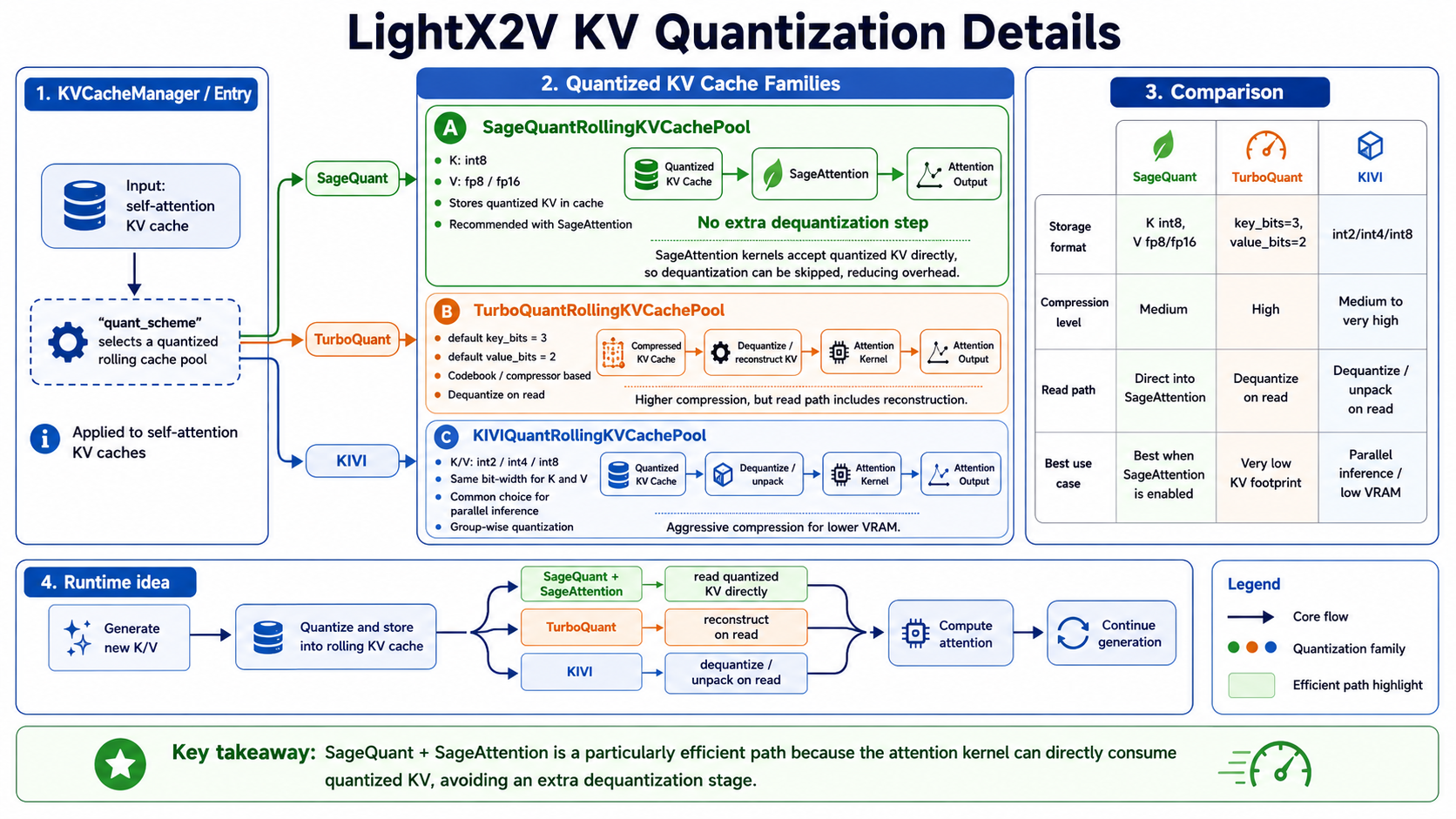 Figure 2: KV quantization backends in LightX2V. SageQuant can work with SageAttention to directly consume quantized KV, while TurboQuant and KIVI focus more on compression ratio and usually require reconstruction, dequantization, or unpacking on the read path.
KV Offload: Moving Part of KV to CPU
The third strategy is KV offload. It is similar in spirit to weight offload, but the target is dynamic KV Cache.
The basic KV offload flow is:
current layer needs KV
        ↓
begin_layer: ensure this layer's KV is in the current GPU buffer
        ↓
attention reads / updates KV
        ↓
end_layer: write back dirty ranges when needed
        ↓
prefetch next layer KV into the other buffer
        ↓
swap GPU buffers
The key point is that KV Cache is not read-only. Every autoregressive step generates new K/V and writes them into the cache. If KV in the current GPU buffer has been updated, the corresponding dirty range must be marked and written back to CPU memory at the right time.
KV Quantization Backends
SageQuant: A Stable Engineering Path for KV Compression
SageQuant can be understood as a KV compression path that works closely with SageAttention. In LightX2V, a common configuration is K in int8 and V in fp8 / fp16. These low-precision KV tensors are not first dequantized back to fp16 / bf16 and then passed to a regular attention backend. Instead, they are consumed directly by SageAttention. This reduces KV Cache VRAM usage and avoids explicit dequantization overhead.
Advantages:
- significantly lower VRAM usage compared with fp16 KV;
- different formats can be used for K and V, balancing compression with attention sensitivity;
- SageAttention can directly consume the corresponding low-precision format, reducing dequantization overhead;
- suitable as a default choice for medium-size models or general scenarios.
Potential costs:
- it needs to be used with the SageAttention backend, since a regular attention backend may not directly consume this format;
- when V uses fp8, GPU support for fp8 must be considered;
- scale selection affects stability;
- in extremely low-VRAM cases, the compression ratio may be less aggressive than int4 / int2 schemes.
KIVI: Low-Bit KV Cache Compression
KIVI is more aggressive and can use int2, int4, or int8. It is suitable for cases where VRAM is very tight and the goal is to reduce KV Cache as much as possible.
KIVI is a better fit when:
- VRAM is highly constrained;
- KV Cache needs to be reduced as much as possible;
- some quantization / dequantization overhead is acceptable;
- more aggressive long-context compression is needed.
It is important to note that lower bit width is not always better. It introduces larger numerical error and potential quality fluctuation, so it should be validated for the specific model, resolution, and generation length.
TurboQuant: More Complex Key/Value Compression
TurboQuant is closer to a compression system. It includes settings such as key bits, value bits, and codebooks, allowing more fine-grained key/value compression.
Its value lies in:
- more fine-grained key/value compression;
- codebook-based compression;
- potentially better compression for long-sequence and long-video scenarios.
It is also more complex:
- codebook management becomes more important;
- the first run may require extra preparation;
- quality and stability need to be validated separately for different models, resolutions, and frame counts.
KV Offload Execution Timeline
The core of KV offload is double buffering: one GPU buffer is used by the current attention computation, while the other GPU buffer prepares the KV needed by the next layer. CPU pinned memory serves as the KV storage area outside GPU memory.
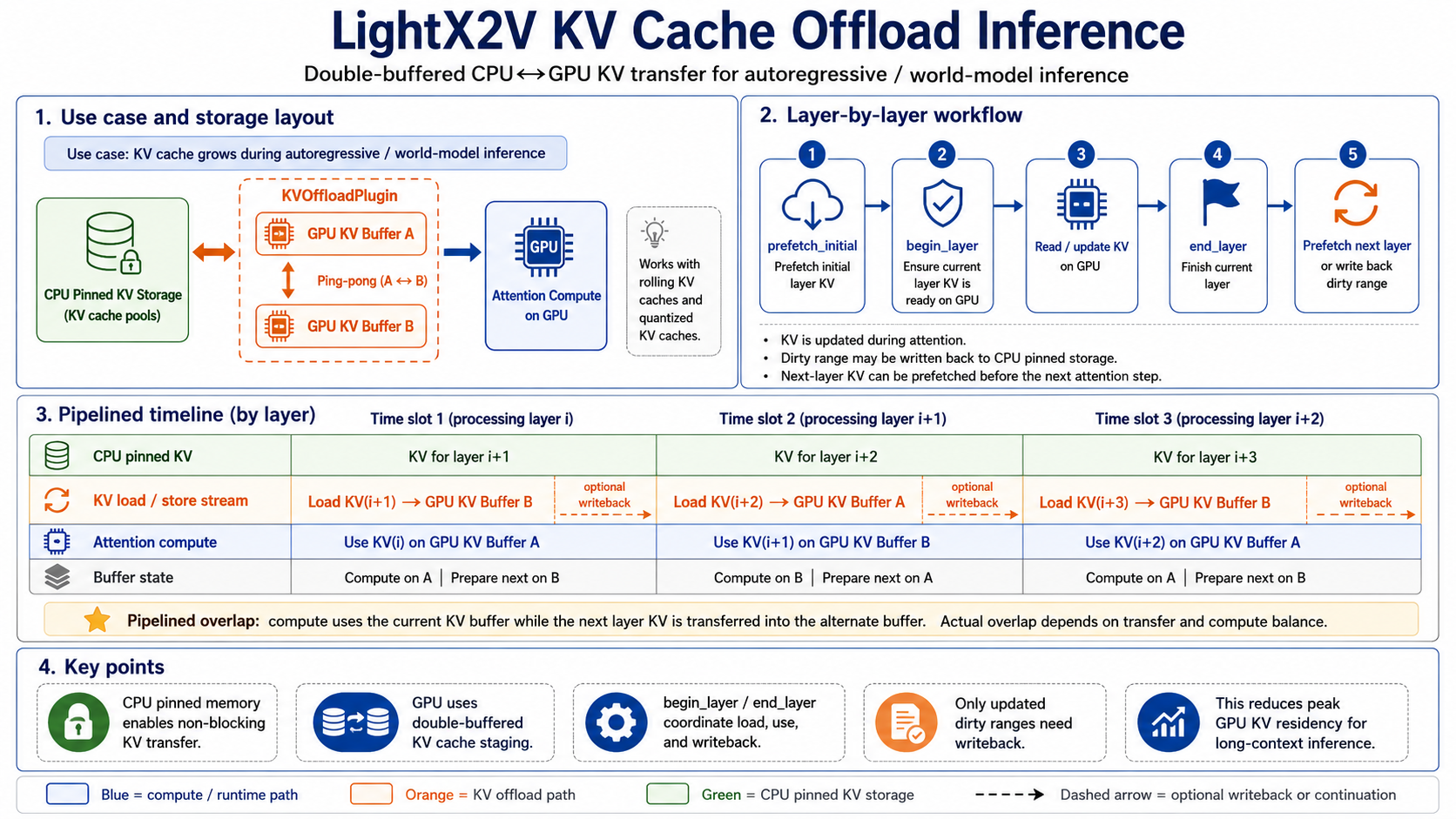 Figure 3: Double-buffered KV offload execution timeline. The current layer computes attention with one GPU buffer, while the other buffer prefetches next-layer KV or writes back dirty ranges, reducing waiting time as much as possible.
As with weight offload, this does not guarantee that every copy is fully hidden behind computation. Instead, the pipeline aims to reduce GPU waiting time. KV offload has three key points.
First, reads and writes are both dynamic.
KV Cache not only loads historical KV but also writes new K/V. If the current buffer is updated, it must mark dirty ranges and write them back at an appropriate time.
Second, double buffering avoids unnecessary blocking.
One buffer is used by the current layer, while the other buffer can prefetch or write back data. The buffers are swapped for the next layer.
Third, event synchronization ensures correctness.
Offload needs a clear synchronization relationship between load, compute, and writeback. The current layer must wait until its KV has been loaded before computation. Modified KV must be written back before the buffer is reused.
How to Enable KV Cache Strategies in Config
In LightX2V, KV Cache settings are placed under ar_config, because they belong to the autoregressive inference path rather than the static model weights. Weight offload settings stay at the top level of the config, because they control where model weights are stored and when they are moved to GPU.
Enable KV Quantization
KV quantization is configured through ar_config.kv_quant. For example, KIVI int4 KV Cache can be enabled as:
{
  "ar_config": {
    "local_attn_size": 21,
    "num_frame_per_chunk": 3,
    "sink_size": 3,
    "kv_quant": {
      "quant_scheme": "kivi",
      "k_cache_type": "int4",
      "v_cache_type": "int4",
      "group_size": 64
    },
    "kv_offload": false
  }
}
For SageQuant, the attention backend should also use the SageAttention path that directly consumes quantized KV:
{
  "self_attn_1_type": "sage_attn2_k_int8_v_fp8",
  "ar_config": {
    "kv_quant": {
      "calibrate": false,
      "calib_path": "/path/to/calib_kv.pt",
      "quant_scheme": "sage",
      "k_cache_type": "int8",
      "v_cache_type": "fp8"
    },
    "kv_offload": false
  }
}
Enable KV Offload
KV offload is controlled by ar_config.kv_offload. It can be used without weight offload, which means model weights remain managed by the normal path, while part of the dynamic KV Cache is moved through the KV offload path.
{
  "cpu_offload": false,
  "ar_config": {
    "local_attn_size": 21,
    "num_frame_per_chunk": 3,
    "sink_size": 3,
    "kv_offload": true
  }
}
KV offload can also be combined with KV quantization:
{
  "cpu_offload": false,
  "ar_config": {
    "kv_quant": {
      "quant_scheme": "kivi",
      "k_cache_type": "int4",
      "v_cache_type": "int4",
      "group_size": 64
    },
    "kv_offload": true
  }
}
Enable KV Offload + Weight Offload
When GPU memory is more constrained, KV offload can be combined with weight offload. In this case, ar_config.kv_offload controls KV Cache movement, while top-level cpu_offload and offload_granularity control model weight movement.
{
  "cpu_offload": true,
  "offload_granularity": "block",
  "t5_cpu_offload": true,
  "vae_cpu_offload": true,
  "ar_config": {
    "kv_quant": {
      "quant_scheme": "kivi",
      "k_cache_type": "int4",
      "v_cache_type": "int4",
      "group_size": 64
    },
    "kv_offload": true
  }
}
This combination targets two different memory sources at the same time: weight offload reduces static model-weight residency on GPU, while KV offload reduces the dynamic historical-state residency created during autoregressive generation.
Recommended Usage Strategies
KV Cache strategies can be selected based on GPU memory and model size.
RTX 5090 / 4090D: Try Quantization First, Then KV Offload If Needed
These GPUs have relatively large VRAM. A recommended first attempt is:
weight offload + KV quantization
If high resolution or long context still approaches the VRAM limit, enable:
weight offload + KV quantization + KV offload
On this tier, KV quantization is usually worth trying before KV offload because it directly reduces GPU-side KV usage without introducing much CPU/GPU transfer.
RTX 4060 / 3060: KV Quant + KV Offload Become More Important
For 8 GB / 12 GB GPUs, KV Cache can easily become the main bottleneck. A practical combination is:
lower-bit KV quant
+ KV offload
+ weight offload
+ lower resolution / frame count / window size
The goal on these devices is usually not maximum speed, but first making the model runnable. After that, quantization backend, local attention, and offload strategy can be tuned step by step.
Data Center GPUs: KV Cache Management Still Matters
Even on A100 / H100 / H200, KV Cache management remains useful. It can:
- increase the video length a single GPU can handle;
- support more concurrent requests;
- reduce peak VRAM in serving scenarios;
- combine with sequence parallelism / tensor parallelism to improve long-sequence throughput.
Lingbot World Fast Performance Comparison
The following tables are reserved for Lingbot World Fast measurements. The recommended setup is to keep the same input conditions, such as resolution, frame count, prompt, seed, GPU, and inference configuration, then record VRAM, latency, and generated video for each strategy. This makes it easier to compare the benefits and costs of different KV Cache strategies.
Some videos are too large to upload directly, so they were compressed with FFmpeg; this may slightly affect visual clarity.
Baseline and Optimization Comparison on a Single H200
The first comparison uses a single H200 GPU. It shows the difference between the original Lingbot implementation and LightX2V under the same generation setting, and then compares KV quantization and KV offload. The 161-frame case is especially useful for showing how KV Cache optimization changes the memory/speed trade-off.
| Method | Frames | KV Quant (int4) | KV Offload | Peak VRAM | Inference Time | Video / Result |
|---|---|---|---|---|---|---|
| Original | 81 | - | - | ~100G | ~92s | |
| LightX2V | 81 | - | - | ~100G | ~56s | |
| Original | 161 | - | - | OOM | - | - |
| LightX2V | 161 | - | - | ~100G | ~110s | |
| LightX2V | 161 | Enabled | - | ~70G | ~151s | |
| LightX2V | 161 | Enabled | Enabled | ~54G | ~255s |
Long-Video Generation on a Consumer GPU
The second comparison highlights one of the most practical goals of KV Cache optimization: generating a one-minute video on a consumer GPU. In this RTX 5090 case, the original Lingbot implementation cannot fit in memory, while LightX2V can run the one-minute generation on a single consumer GPU by combining KV quantization, KV offload, and weight offload.
| Method | Frames | KV Quant (int4) | KV Offload | Weight Offload | Peak VRAM | Inference Time | Video / Result |
|---|---|---|---|---|---|---|---|
| Original | 961 | - | - | - | OOM | - | - |
| LightX2V | 961 | Enabled | Enabled | Enabled | 23G | ~1h |
Conclusion
LightX2V KV Cache management can be summarized in one sentence:
For autoregressive video models, VRAM optimization cannot focus only on weights; it must also manage the growing historical KV state.
From an engineering perspective, LightX2V provides three layers of abstraction:
- KV Cache Manager unifies KV Cache creation, initialization, and lifecycle management across different autoregressive models;
- Rolling / Local Attention controls the history window and prevents KV from growing without bound;
- KV Quantization + KV Offload reduce KV Cache VRAM usage, while double buffering and asynchronous streams reduce transfer overhead as much as possible.
The Lingbot World Fast measurements show the same pattern in practice. On H200, LightX2V improves the baseline inference time, while KV Cache optimization can significantly reduce peak VRAM at the cost of extra transfer or quantization overhead. On RTX 5090, combining KV quantization, KV offload, and weight offload turns a one-minute generation case from OOM into a runnable single-GPU workload.
As autoregressive video generation and real-time world models continue to evolve, KV Cache will become an increasingly important part of inference systems. For consumer GPUs, weight offload addresses static weight memory pressure, while KV Cache management addresses dynamic historical-state memory pressure. Combining the two is what makes larger long-sequence video models practical on local devices.