Running Large Video Models on Consumer GPUs: LightX2V Offload Explained
Video generation models are growing quickly. A 14B, 28B, or even larger DiT / Transformer backbone can easily exceed the memory capacity of a single RTX 4090 or RTX 5090 in BF16. After adding the text encoder, image encoder, VAE, attention buffers, and intermediate activations, the full pipeline becomes even more memory hungry.
LightX2V Offload addresses a practical problem: during inference, the GPU only needs the weights for the part of the model currently being computed. The remaining weights can stay in CPU memory, or even on NVMe storage, and be moved to the GPU right before they are needed.
This post explains LightX2V’s multi-level Offload design:
- three offload granularities:
model,block, andphase; - CPU ↔ GPU weight transfer, plus Disk / NVMe as an additional source when
lazy_load=true; - asynchronous prefetching and double buffering;
- how LightX2V turns offload from a single-model optimization into a framework-level capability;
- practical recommendations for consumer GPUs such as the RTX 3060, RTX 4090, and RTX 5090.
Table of contents:
- Why Video Generation Needs Offload
- LightX2V Offload Architecture
- Three Granularities: Model, Block, and Phase
- CPU-GPU Offload and Lazy Load
- Wan2.2-A14B as an Example
- Practical Recommendations for Consumer GPUs
- How to Enable Offload in Config Files
- Performance Example
- Conclusion
Why Video Generation Needs Offload
Video generation hits the memory wall more easily than image generation, and not only because model parameter counts are increasing. A typical X-to-Video pipeline contains several large components:
| Component | Examples | Memory Pressure |
|---|---|---|
| Text / Image Encoder | T5, Qwen2.5-VL, CLIP, SigLIP | Prompt / image condition preprocessing |
| Transformer / DiT | Wan, HunyuanVideo, LTX, Qwen-Image, SeedVR2 | Dominant model weight and activation footprint |
| VAE Encoder / Decoder | Video VAE | High-resolution latent / pixel conversion |
LightX2V provides offload capabilities for different modules. To keep the discussion focused, this post mainly covers offload for the DiT / Transformer backbone, which is usually the largest part of the pipeline. Offload for other modules, such as text encoders, image encoders, and VAEs, is supported but not discussed in detail here.
In data centers, insufficient GPU memory can often be handled with larger GPUs or multi-GPU deployment. In local creation and development environments, however, consumer GPUs with 12 GB, 16 GB, 24 GB, or 32 GB of VRAM are much more common. In these setups, system memory and NVMe storage are often more abundant than GPU memory, making offload a practical engineering solution.
LightX2V uses a three-level storage hierarchy:
GPU memory: current compute weights, activations, workspace
CPU memory: warm weight pool and pinned transfer buffers
Disk / NVMe: optional weight source when lazy_load=true
Offload is not a free speedup. It trades extra data movement, asynchronous scheduling, and buffer management for lower peak GPU memory. The benefit is that models that would otherwise OOM can run on consumer hardware. With careful scheduling, part of the transfer overhead can also be hidden behind GPU computation.
LightX2V Offload Architecture
LightX2V treats Offload as a framework-level capability rather than a one-off patch for a specific model. The same design applies across several model families:
- video generation: Wan2.1 / Wan2.2, HunyuanVideo, LTX;
- image generation: Qwen-Image;
- video restoration / super-resolution: SeedVR2;
- world models: Matrix Game, HY-WorldMirror;
- autoregressive video models: Self-Forcing / Lingbot-style pipelines.
The core execution model can be summarized as follows:
                ┌────────────────┐
                │  CPU / Disk    │
                │ weight storage │
                └───────┬────────┘
                        │ prefetch
                        ▼
┌──────────────┐  H2D  ┌──────────────┐
│ CPU buffer   │ ────→ │ GPU buffer   │
│ pinned / hot │       │ current unit │
└──────────────┘       └──────┬───────┘
                              │
                              ▼
                         Transformer
                          compute
At the weight-container level, LightX2V packages blocks and phases as movable units. At the inference level, an offload manager handles prefetching, copying, stream synchronization, and buffer swapping. When lazy_load=true, the weight source is further extended to Disk / NVMe.
The key idea is not simply “put weights on CPU.” More importantly, different models can share the same scheduling abstraction while keeping the model-specific execution details they need. For models with regular Transformer structures, LightX2V can use two GPU buffers for ping-pong prefetching. For models whose block structures are not fully uniform, a more conservative per-block transfer strategy can be used instead.
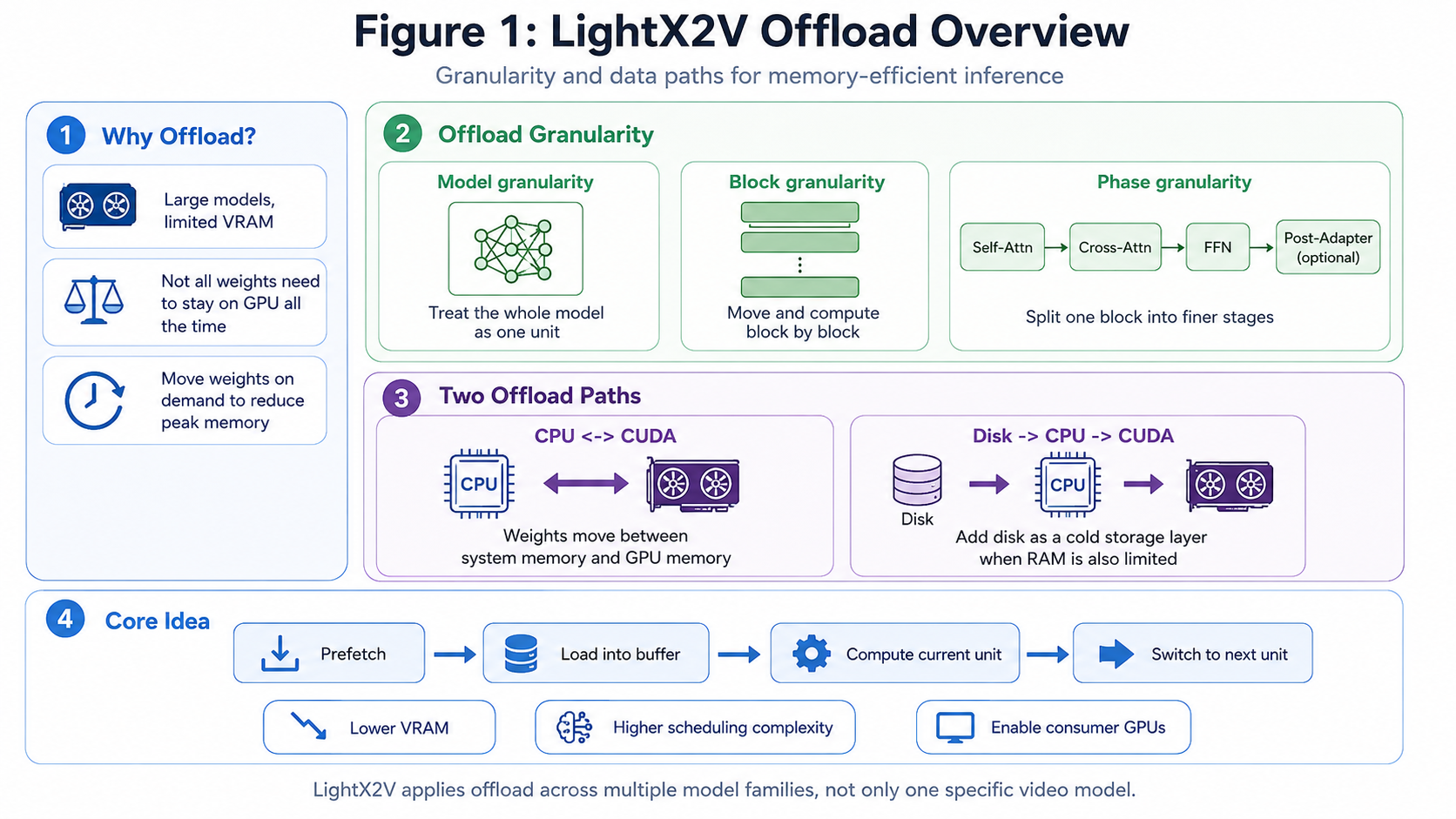 Figure 1: LightX2V Offload overview, including the motivation, three granularities, the CPU ↔ GPU path, and Disk / NVMe as an additional source when
 lazy_load=true.
In the CPU-to-GPU transfer path, LightX2V relies on two important kinds of buffers.
Pinned memory is a stable staging area on the CPU side. Regular CPU memory may be moved or paged by the operating system, which makes it hard for the GPU to read efficiently during high-speed transfers. Pinned memory is fixed in place, so it is suitable as a source address for GPU DMA reads. Intuitively, regular CPU memory is like a temporary storage area, while pinned memory is like a dedicated loading dock for the GPU.
GPU buffer is a fixed workspace in GPU memory. After weights are copied from CPU to GPU, they need to land in stable GPU memory so attention, MLP, and other kernels can read them directly. For block offload, a common strategy is to allocate two GPU buffers: one for computing the current block and another for receiving the next block’s weights. With fixed GPU buffers, each iteration only needs to overwrite the buffer with the next set of weights through H2D. There is no need to copy the current weights back to CPU (D2H), nor to repeatedly free and reallocate GPU memory. This reduces copy overhead, allocation/free overhead, and potential synchronization stalls.
Three Granularities: Model, Block, and Phase
LightX2V Offload can be understood through three granularities: model, block, and phase. Finer granularity reduces peak GPU memory but increases scheduling complexity and the number of transfers.
Model-Level Offload
model granularity treats the whole module as one unit. For example, the Transformer can be moved to GPU before inference and moved back to CPU afterward, or non-critical modules can be placed on demand.
This is suitable when:
- the model is close to the GPU memory limit but does not exceed it by too much;
- only coarse movement between pipeline stages is needed;
- implementation simplicity and low scheduling overhead are preferred.
The limitation is clear: the entire DiT or Transformer still needs to reside on GPU during execution, so peak-memory reduction is limited.
Block-Level Offload
block granularity is the most common balance point in LightX2V. A Transformer is composed of multiple blocks, and inference only moves the current block, or the next block, to GPU:
Compute block i on GPU buffer A
Prefetch block i+1 into GPU buffer B
Swap A/B
Compute block i+1
This strategy works well for most consumer GPUs: peak memory is much lower than keeping the whole model resident, while scheduling remains easier to manage than phase-level offload.
For models with regular structures, such as Wan, HunyuanVideo, and Qwen-Image, block offload can typically use two GPU buffers for ping-pong prefetching.
Phase-Level Offload
phase granularity further splits a Transformer block into smaller computation stages, such as:
Self-Attention → Cross-Attention → FFN → Post-Adapter
This further reduces peak memory and is useful for very memory-constrained devices such as RTX 3060 / RTX 4070-class GPUs. The cost is higher scheduling complexity: intermediate results must be preserved between phases, and weight transfer, compute streams, and buffer lifetimes must be carefully aligned.
Granularity Trade-off
| Granularity | Peak GPU Memory | Scheduling Complexity | Typical Use Case |
|---|---|---|---|
model |
Highest | Low | Coarse module placement |
block |
Medium | Medium | Consumer GPUs with enough CPU memory |
phase |
Lowest | High | Very tight VRAM budget |
CPU-GPU Offload and Lazy Load
Offload is not only about granularity. It also depends on where weights come from and how they are moved to GPU. LightX2V’s default path is CPU ↔ GPU. When lazy_load=true, Disk / NVMe is added as an additional weight source.
CPU ↔ GPU Offload
This is the most common mode: weights are prepared in CPU memory and copied to GPU by block or by phase during inference.
CPU pinned buffer ──H2D──> GPU buffer ──compute──> next unit
The key ingredients are pinned memory, asynchronous copy, and double buffering. Ideally, while the GPU is computing the current block, the next block’s weights are already being copied into another GPU buffer on a separate stream. In this case, part or most of the H2D transfer can be hidden behind computation.
In other words, CPU ↔ GPU offload does not mean “the GPU computes directly using CPU-resident weights.” The actual process is: weights are prepared in a pinned CPU buffer, copied into a GPU buffer through H2D, and then read by GPU kernels from that buffer.
Because the GPU buffer is fixed and reused, the current block’s weights typically do not need to be copied back to CPU through D2H after execution. The buffer also does not need to be freed. The next iteration simply overwrites it with a new H2D copy.
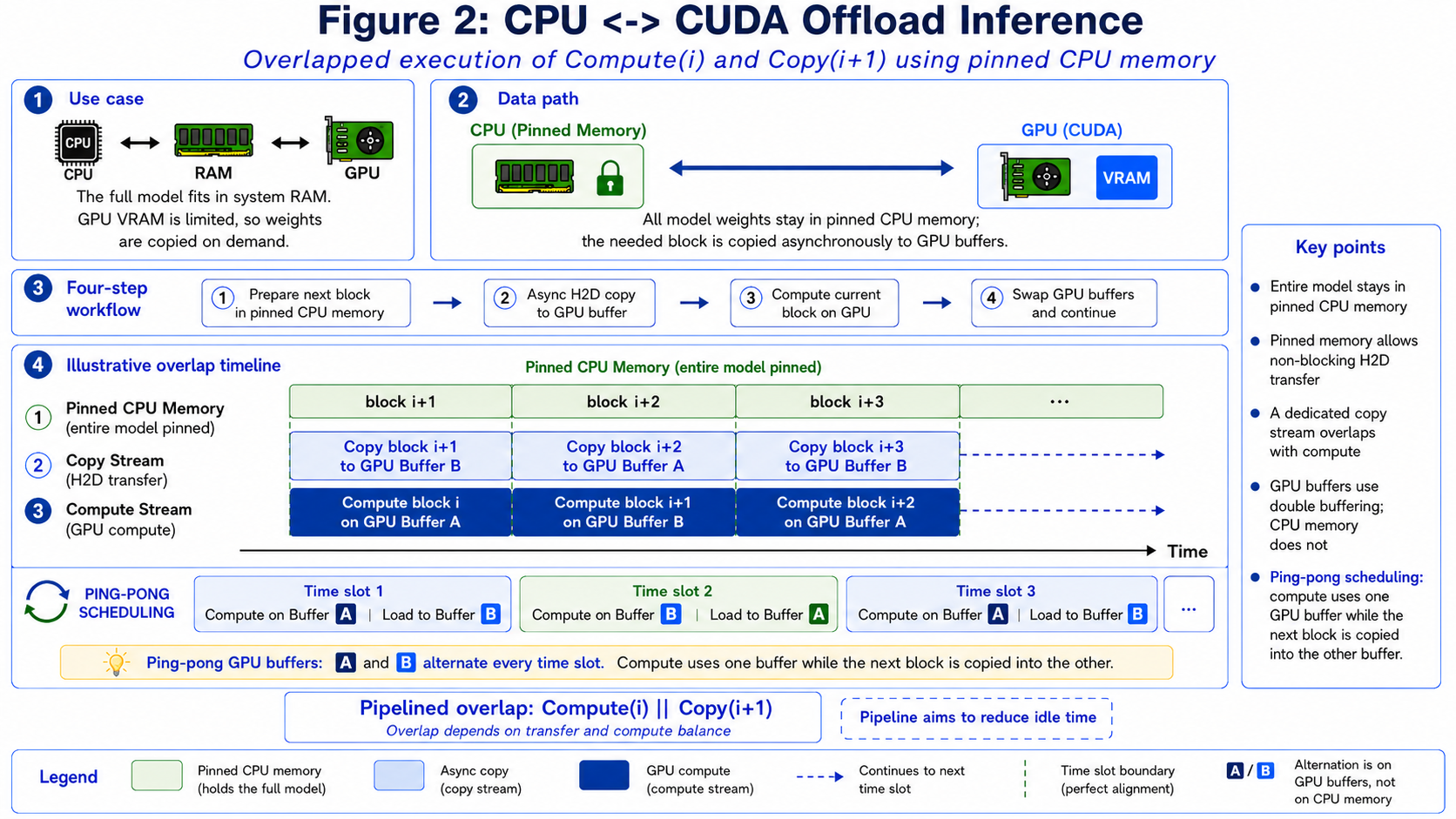 Figure 2: CPU ↔ GPU block offload. Ideally, compute for the current block can overlap with H2D copy for the next block. Fixed GPU buffers also avoid D2H transfer and repeated GPU memory allocation/free.
Advantages:
- no dependency on real-time disk reads;
- more stable latency;
- suitable for local workstations with enough system memory.
Main bottlenecks:
- CPU memory usage can still be high;
- PCIe bandwidth can limit transfer speed;
- if blocks are small or computation is fast, transfers are harder to hide.
Lazy Load
lazy_load=true means weights do not all need to be resident in CPU memory in advance. Instead, they can be loaded from Disk / NVMe on demand and then enter the normal offload path.
Disk / NVMe → CPU buffer → GPU buffer
Regular CPU offload mainly addresses GPU memory pressure. lazy_load=true further introduces disk storage, reducing the need for all weights to stay resident in CPU memory.
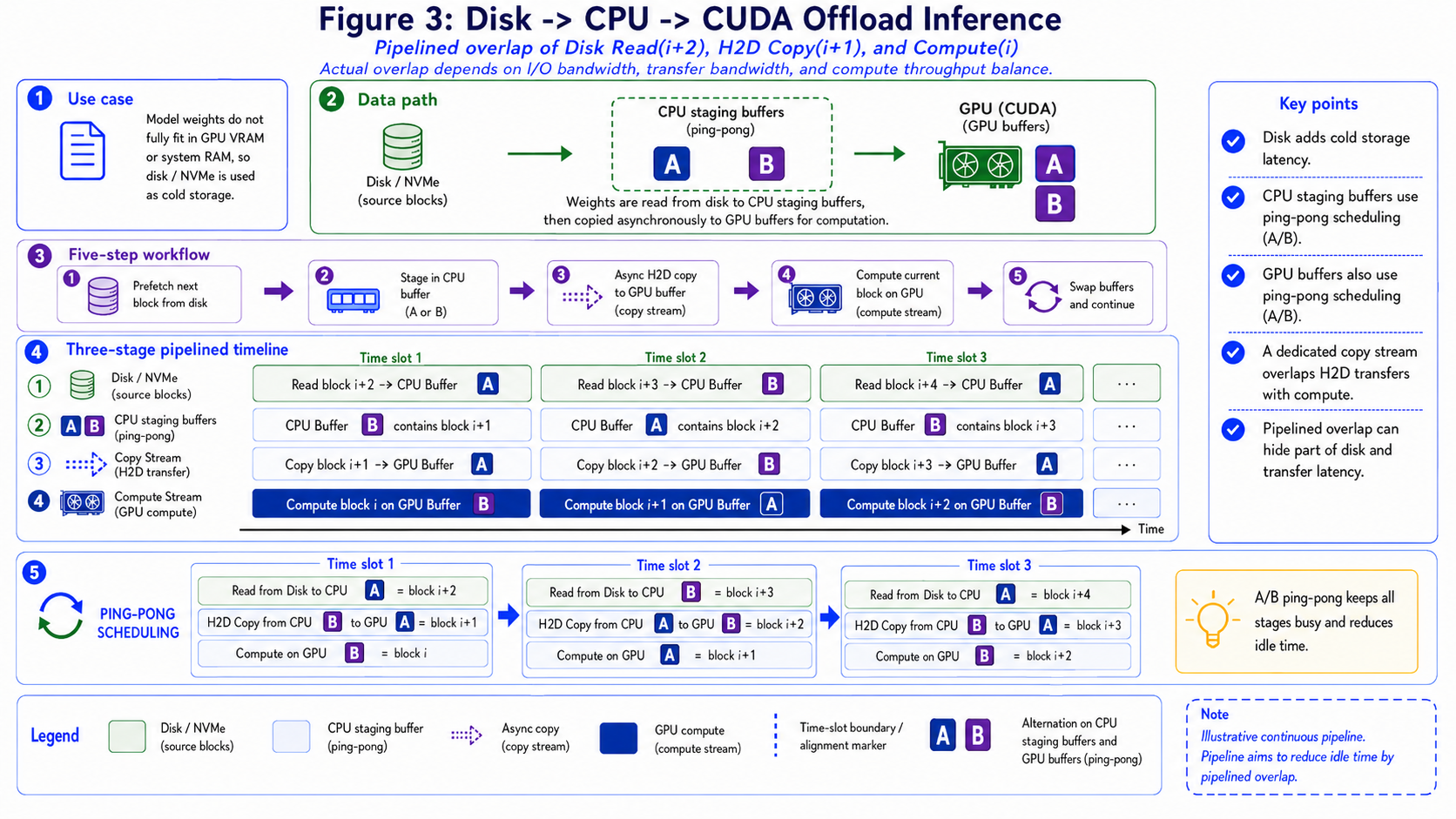 Figure 3: When
 lazy_load=true, Disk / NVMe becomes an additional weight source. The figure shows the relationship between Disk, CPU buffers, and GPU buffers.
Wan2.2-A14B as an Example
Wan2.2-A14B contains two DiT backbones: a high-noise model and a low-noise model. With traditional whole-model offload, switching between the two models often requires large CPU/GPU weight transfers. As a result, some denoising steps can show visible latency spikes.
Block offload moves the transfer granularity from “the whole model” down to “a single block.” While the current block is computing on GPU, the next block’s weights can be prefetched into another GPU buffer. This reduces peak GPU memory and avoids much of the whole-model transfer overhead when switching between the high-noise and low-noise models.
More concretely, near the end of the high-noise model, the GPU may be computing the last high-noise block while the offload stream starts copying the first low-noise block into an idle GPU buffer. When high-noise computation finishes, the first low-noise block is already ready, or nearly ready. The transition no longer has to wait for the entire low-noise model to transfer, reducing the stall at the model boundary.
Practical Recommendations for Consumer GPUs
The offload strategy should be chosen based on GPU memory, CPU memory, disk bandwidth, and model structure. A simple rule is: start with the coarsest strategy that runs, and move to a finer granularity only when memory is still insufficient.
RTX 5090 / RTX 4090
These high-end consumer GPUs usually work best with block offload:
- use
blockgranularity for large DiT / Transformer backbones; - keep small or frequently used modules resident on GPU when possible;
- combine with FP8 / INT8 / NVFP4 quantization;
- if system memory is sufficient,
lazy_loadis usually unnecessary.
Recommended starting point:
{
  "cpu_offload": true,
  "offload_granularity": "block",
  "lazy_load": false
}
RTX 3060 / RTX 4070-Class GPUs
For 8 GB to 16 GB GPUs, the first goal is often simply to run the model. Consider:
- switching to
phaseif block offload still OOMs; - enabling
lazy_loadif CPU memory is also limited, introducing Disk / NVMe; - reducing resolution, frame count, or batch size;
- combining offload with quantization;
- avoiding long-term GPU residency for non-critical modules.
Example configuration:
{
  "cpu_offload": true,
  "offload_granularity": "phase",
  "lazy_load": true,
  "num_disk_workers": 4
}
How to Enable Offload in Config Files
LightX2V Offload is mainly controlled through configuration files. The most important fields are:
cpu_offload: whether to enable weight offload.offload_granularity: the offload granularity, commonlymodel,block, orphase.lazy_load: whether to introduce Disk / NVMe as a weight source.
The simplest model-level offload:
{
  "cpu_offload": true,
  "offload_granularity": "model"
}
More commonly used block-level offload:
{
  "cpu_offload": true,
  "offload_granularity": "block",
  "lazy_load": false
}
When GPU memory is tighter, try phase-level offload:
{
  "cpu_offload": true,
  "offload_granularity": "phase",
  "lazy_load": false
}
If you do not want all weights to stay resident in CPU memory, enable lazy load:
{
  "cpu_offload": true,
  "offload_granularity": "block",
  "lazy_load": true,
  "num_disk_workers": 4
}
In practice, try the following order:
- If memory is almost enough, start with
offload_granularity="model". - For large models on consumer GPUs, prefer
offload_granularity="block". - If block offload still OOMs, try
offload_granularity="phase". - If CPU memory is also limited, enable
lazy_load=true.
Offload is often combined with quantization. For example, large models can use cpu_offload=true together with FP8 / INT8 / NVFP4 quantization to further reduce GPU memory usage.
Performance Example
The table below compares Wan2.2-A14B on a 5-second 480P generation task using a single H200 GPU. The prompt, resolution, frame count, seed, and quantization setting are kept fixed. The table records peak VRAM, time per denoising step, and the time spent switching between the high-noise and low-noise models.
| Strategy | cpu_offload |
offload_granularity |
Peak VRAM | Time per Denoising Step | High/Low Switch Time |
|---|---|---|---|---|---|
| No offload | false | - | ~71G | ~2.4s | None |
| Model offload | true | model | ~36G | ~2.4s | ~1.13s |
| Block offload | true | block | ~16G | ~2.45s | Negligible |
| Phase offload | true | phase | ~11G | ~2.45s | Negligible |
Model offload greatly reduces peak VRAM, but it introduces a visible high/low model switching cost. Block offload and phase offload reduce VRAM further while almost hiding the switching overhead. Their denoising-step latency stays close to the no-offload baseline, showing that LightX2V overlaps communication and computation effectively.
The following figure shows another performance view for Wan2.2-A14B on a 5-second 480P generation task. The left chart shows per-iteration latency, where lower is better. The right chart compares peak VRAM usage against the GPU’s maximum VRAM capacity.
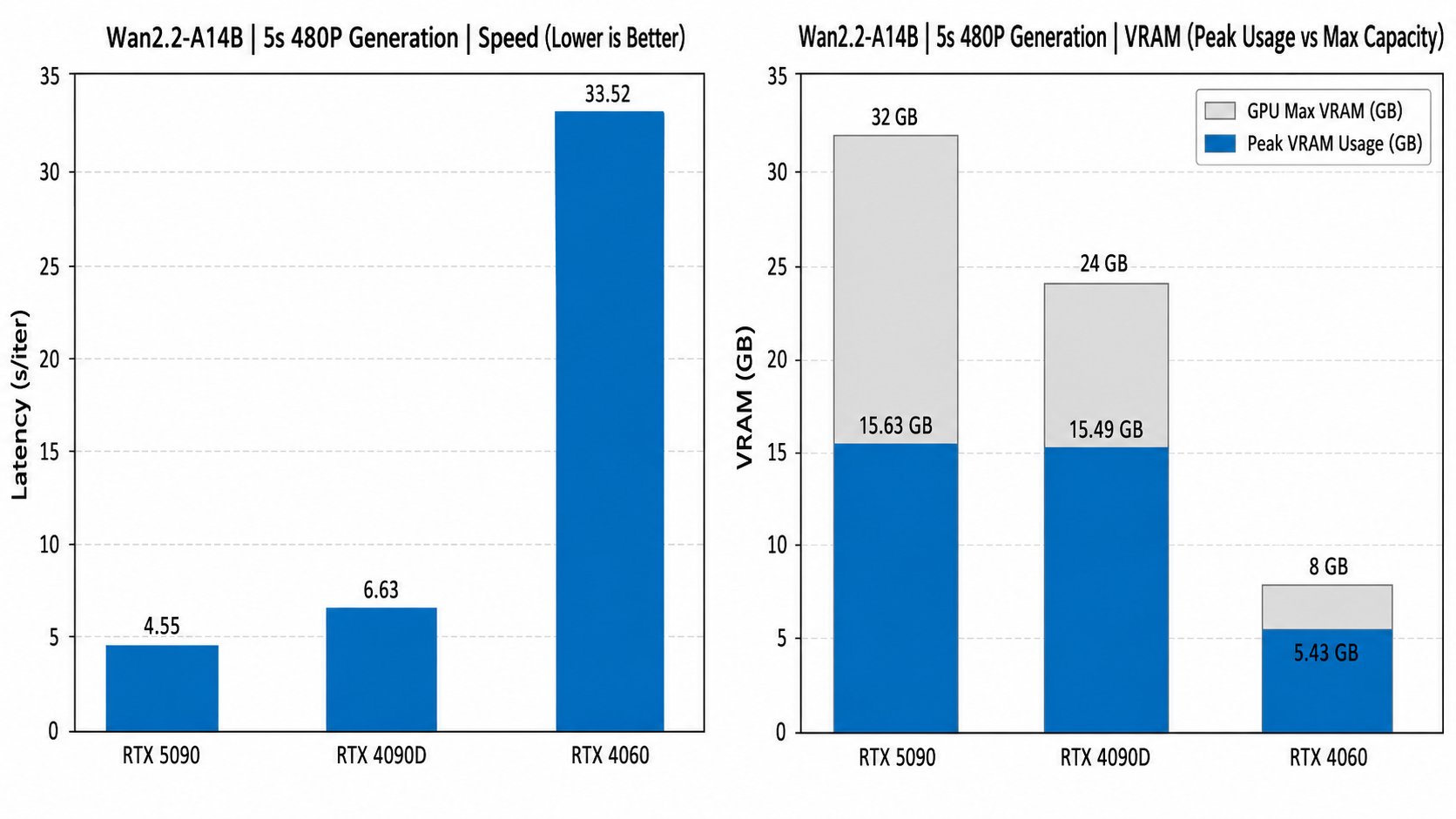 Figure 4: Speed and peak VRAM example for Wan2.2-A14B 5s 480P generation.
The figure shows that Offload allows the same 14B-level video model to run across different VRAM tiers, from RTX 5090 and RTX 4090D to RTX 4060. High-end GPUs have lower per-iteration latency, while the 8 GB RTX 4060 can still keep peak VRAM within capacity, at the cost of slower inference.
This reflects the core trade-off of Offload: it first solves the “can it run?” problem, and then uses block / phase granularity, quantization, and prefetching strategies to recover speed.
Conclusion
LightX2V Offload can be summarized in one sentence:
Instead of requiring all weights to stay resident on GPU, LightX2V moves the weights that will be needed next to the GPU during inference.
This is built on three design choices:
- split weights by
model,block, orphase; - move weights through CPU ↔ GPU transfer, and introduce Disk / NVMe when
lazy_load=true; - overlap prefetching, transfer, and computation as much as possible.
For high-end consumer GPUs, block offload usually provides a good balance between memory and speed. For low-memory GPUs, phase offload and lazy load further lower runtime memory requirements. In production deployment, the same mechanism can also be combined with quantization, feature caching, attention optimization, and disaggregated inference to improve overall resource efficiency.
As video generation models continue to grow, Offload will become less like a fallback for insufficient VRAM and more like a core capability of large-model inference runtimes.